
What you need before you start
AdsPower runs separate browser profiles, each with its own fingerprint, cookies and proxy, for work such as client profile management and localized QA. You need:
- The AdsPower desktop client, updated. The newest version in AdsPower's release notes on 1 Oct 2026 was v8.7.23.
- A TrueProxies account with a Traffic pack for residential IPv4, or the one-hour free trial. The trial supports country targeting and sticky sessions, without
lifetime; city, region, ASN and session lifetimes need a Traffic pack. - Your connection details: host, username and password from your TrueProxies dashboard (connection guide). Ports are 8080 (HTTP), 8443 (HTTPS) and 1080 (SOCKS5). Examples here use
YOUR_HOST,YOUR_USERNAMEandYOUR_PASSWORD. - Username and password auth. Session IDs and targeting ride in the username, so enter the password too. In our test, AdsPower sent no login at all when the password field was empty: with your IP on the trusted IP list the proxy still connected, but it ignored the country and session options.
Which TrueProxies proxy to use in AdsPower
Most AdsPower profiles need a residential IP that holds for a working session. That is the Traffic pack.
| TrueProxies option | Use in AdsPower? | Details |
|---|---|---|
| Traffic pack (residential IPv4, pay per GB) | Recommended | 50M+ residential IPs in 150+ countries, with country, region, city and ASN targeting. Rotating, or sticky for 1 minute to 24 hours. $1.64/GB for 1 GB, $0.97/GB at 100 GB, $0.81/GB at 1,000 GB. |
| Datacenter IPv6 | Only for IPv6-ready targets | From $3.99/day for a private /48 in one city chosen at purchase. Sites without an IPv6 address return 502. |
| Static ISP | Not offered | A profile that must keep one IP for weeks needs a static ISP proxy from elsewhere. |
| Mobile | Not offered | AdsPower's change IP URL field is for mobile proxies; leave it empty. |
Bigger packs go down to $0.60/GB at 5,000 GB; the full ladder is on the pricing page.
Proxy formats AdsPower accepts
AdsPower takes proxies in a profile's Host:Port field, the Add Proxy box on the Proxies page, Bulk Create templates and the Local API. Text formats run host, port, username, password.
| Format as AdsPower documents it | TrueProxies example | Where it works |
|---|---|---|
IP:port:username:password in Host:Port | YOUR_HOST:1080:YOUR_USERNAME-country-us-session-ads01-lifetime-86400:YOUR_PASSWORD (type SOCKS5) | Single profile |
192.168.0.1:8000:username:password{Remark} | YOUR_HOST:8080:YOUR_USERNAME-country-gb-city-london-session-ads02-lifetime-86400:YOUR_PASSWORD{ads02} | Add Proxy |
socks5://192.168.0.1:8000[Change IP URL]{Remark} | socks5://YOUR_HOST:1080:YOUR_USERNAME-country-de-city-berlin-session-ads03-lifetime-86400:YOUR_PASSWORD{ads03} | Add Proxy |
proxytype column plus proxy as Host:Port:Username:Password | socks5 and YOUR_HOST:1080:YOUR_USERNAME-country-fr-city-paris-session-ads04-lifetime-86400:YOUR_PASSWORD | Bulk Create |
IPv6 host in brackets: [Host]:Port:Username:Password | Only for a raw IPv6 address; enter your TrueProxies host as the dashboard shows it | Add Proxy, Bulk Create |
user_proxy_config JSON: proxy_type, proxy_host, proxy_port, proxy_user, proxy_password | "proxy_type": "socks5", "proxy_host": "YOUR_HOST", "proxy_port": "1080" | Local API |
In AdsPower's examples, [ ] holds a change IP URL and { } a remark. TrueProxies needs no change IP URL, so use the remark to name the profile. AdsPower doesn't document a socks5:// prefix with credentials, or the type a line without a prefix gets. Our test: The saved host:port:username:password entries connected over HTTP and SOCKS5. Prefix parsing and the default type were not tested separately. The user:pass@host:port order isn't documented either, so rewrite it as host, port, username, password.
How to add a proxy to an AdsPower profile
AdsPower proxy setup for one profile
- Click New Profile in the top left, or edit an existing profile.
- In the Proxy section, choose Custom.
- Set the proxy type to HTTP (port 8080) or SOCKS5 (port 1080).
- Paste the full line into Host:Port, for example
YOUR_HOST:8080:YOUR_USERNAME-country-us-city-chicago-session-ads05-lifetime-86400:YOUR_PASSWORD. AdsPower fills in the port, username and password. - Leave the change IP URL empty. A new IP comes from a new session ID.
- Choose the IP checker, such as IP2Location or ip-api, that looks up the exit's location. Otherwise the Global Settings default applies.
- Click Check proxy and confirm the exit IP and location.
- Set the Fingerprint options below, click OK and open the profile.
Save proxies once, pick them per profile
On the Proxies page, click Add Proxy, paste one line per proxy, review the list under the box and click OK. Then, in a profile's Proxy section, open Saved Proxies and pick the proxy whose remark matches the profile.
AdsPower's random button picks from the whole list or only unused proxies. Pick by hand, or limit it to unused proxies, because profiles on one saved proxy share one IP. The Serial No. column shows which profiles use each proxy.
Add proxies in bulk
Add Proxy loads many proxies at once. Paste one line each, with a unique session ID and the profile name as the remark:
socks5://YOUR_HOST:1080:YOUR_USERNAME-country-us-session-shopus01-lifetime-86400:YOUR_PASSWORD{shopus01}
socks5://YOUR_HOST:1080:YOUR_USERNAME-country-us-region-NY-session-shopny01-lifetime-86400:YOUR_PASSWORD{shopny01}
http://YOUR_HOST:8080:YOUR_USERNAME-country-gb-city-london-session-shopuk01-lifetime-86400:YOUR_PASSWORD{shopuk01}
http://YOUR_HOST:8080:YOUR_USERNAME-country-de-city-berlin-session-shopde01-lifetime-86400:YOUR_PASSWORD{shopde01}
socks5://YOUR_HOST:1080:YOUR_USERNAME-country-ca-city-toronto-session-qaca01-lifetime-3600:YOUR_PASSWORD{qaca01}
Bulk Create makes many profiles, each with its own proxy:
- Click the + beside New Profile to open Bulk Create, then choose Mass import.
- Download the Excel or text template.
- Fill in one profile per row. In Excel, delete the example in row 2, keep every column and title, and don't merge cells. In the text file, delete the description paragraphs and separate profiles with a line of asterisks.
- Import the file and check the new profiles.
| Column | Example | Notes |
|---|---|---|
name | shopus01 | Match the session ID |
proxytype | socks5 | Required. http for 8080, socks5 for 1080; also takes https, ssh and noproxy |
proxy | YOUR_HOST:1080:YOUR_USERNAME-country-us-session-shopus01-lifetime-86400:YOUR_PASSWORD | A unique session ID per row |
ipchecker | ip-api | Or IP2Location; blank uses Global Settings |
proxyid | empty | A saved proxy's ID instead of proxy. Avoid random with per-profile sessions |
proxyurl, countrycode, regioncode, citycode | empty | Location goes in the TrueProxies username |
Two profiles in the text template:
name=shopus01
proxytype=socks5
proxy=YOUR_HOST:1080:YOUR_USERNAME-country-us-session-shopus01-lifetime-86400:YOUR_PASSWORD
ipchecker=ip-api
****************************
name=shopuk01
proxytype=http
proxy=YOUR_HOST:8080:YOUR_USERNAME-country-gb-city-london-session-shopuk01-lifetime-86400:YOUR_PASSWORD
ipchecker=IP2Location
For profiles that already exist, change each Proxy section (the pencil next to the IP on the profile list opens it) or use the Local API below.
Add proxies through the AdsPower API
AdsPower documents a Local API inside the desktop client at http://local.adspower.net:50325 (or http://localhost:50325) for paid plans. With security verification on, send your API key as Authorization: Bearer. Rate limits run from 2 to 10 requests per second depending on profile count, and the v2 endpoints need the latest patch.
This call creates a profile with its own proxy. proxy_soft is other for a proxy you bring:
export TP_PROXY_HOST="YOUR_HOST"
export TP_PROXY_USER="YOUR_USERNAME-country-us-session-shopus01-lifetime-86400"
export TP_PROXY_PASS="YOUR_PASSWORD"
export ADSPOWER_API_KEY="YOUR_API_KEY"   # only if security verification is on

curl -s -X POST "http://local.adspower.net:50325/api/v2/browser-profile/create" \
  -H "Content-Type: application/json" \
  -H "Authorization: Bearer $ADSPOWER_API_KEY" \
  -d @- <<EOF
{
  "name": "shopus01",
  "group_id": "0",
  "user_proxy_config": {
    "proxy_soft": "other",
    "proxy_type": "socks5",
    "proxy_host": "$TP_PROXY_HOST",
    "proxy_port": "1080",
    "proxy_user": "$TP_PROXY_USER",
    "proxy_password": "$TP_PROXY_PASS"
  },
  "fingerprint_config": {
    "automatic_timezone": "1",
    "language_switch": "1",
    "location_switch": "1"
  }
}
EOF
The reply carries the new profile_id, and the three fingerprint_config switches set timezone, language and location from the IP.
POST /api/v2/proxy-list/create adds up to 500 proxies per request to the Proxies page (type, host and port, with optional user, password, remark and ipchecker). It doesn't check for duplicates and returns each proxy_id, which a profile can take as proxyid. To move an existing profile to another proxy, send its user_id with a new user_proxy_config or proxyid to POST /api/v1/user/update. These calls are from AdsPower's API docs; we haven't tested them, because the Local API needs a paid plan.
One sticky session per profile
Give every AdsPower profile its own session ID and keep it for as long as the profile should look like one visitor. Name it by purpose, country and number (shopuk01, shopuk02, qade01) and reuse it as the profile name and proxy remark. Session IDs take 1 to 32 letters or digits, with no hyphens or underscores, because the hyphen separates options.
Set lifetime between 60 and 86400 seconds; without it, a session holds its IP only briefly. Use lifetime-86400 for profiles you work in all day and lifetime-3600 for an hour of QA. Sessions are held on a best-effort basis: if the residential exit goes offline, the session gets a new IP. When that happens, keep the ID, run Check proxy and reopen the profile so its timezone and location follow the new exit. For a fresh IP on purpose, change the ID (shopuk01 to shopuk01b).
A profile that must keep one IP for weeks needs a static ISP proxy, which TrueProxies does not offer. See sticky vs rotating proxies and ISP vs residential proxies.
Match the profile to the proxy location
AdsPower sets a profile's location signals from the exit IP. In the Fingerprint section:
- Timezone, Language and Location: keep Based on IP, the default. For sites that request location, choose Ask each time, Always allow or Block.
- WebRTC: Disabled stops leaks but can break calls and camera features. On our 8.7.23 test account, a new profile's overview listed WebRTC as "Proxy UDP", so check the setting rather than assume a default. Replace shows the proxy IP; Forward is AdsPower's upgraded Replace that uses Google's STUN servers. Real exposes your real IP. A separate option blocks UDP traffic that skips the proxy.
Based on IP is only as good as the lookup, because AdsPower searches the exit IP in your IP checker's database. If a Chicago exit shows Eastern time, switch between IP2Location and ip-api and check again.
Then open the IP leak test, WebRTC leak test and DNS leak test inside the profile. IP, timezone and language should all match the session's location. For localized QA, target the city (-country-gb-city-london), not just the country.
HTTP, HTTPS or SOCKS5 in AdsPower
AdsPower supports "HTTP/HTTPS, socks5, or ssh," plus No Proxy(Local network) for a direct connection. Pair each type with its TrueProxies port:
| AdsPower type | TrueProxies port | Notes |
|---|---|---|
| HTTP | 8080 | Safe default. HTTPS sites stay encrypted through CONNECT, and errors return a reason. |
| SOCKS5 | 1080 | Also safe. Failures carry no reason text. |
| HTTPS | 8443 | TrueProxies 8443 is HTTP CONNECT over TLS to the proxy. AdsPower doesn't say whether its HTTPS type opens TLS to the proxy. Our test: Passed on all 10 saved sessions using HTTPS on 8443, with TLS to the proxy. |
| SSH | None | TrueProxies doesn't offer SSH. |
On 8443 your proxy login also travels inside TLS. If HTTPS fails the check, use HTTP on 8080. More in HTTP vs SOCKS5.
AdsPower IPv6 proxies
AdsPower supports IPv6 proxies alongside IPv4 and accepts an IPv6 host in brackets. With TrueProxies, the exit decides what works:
- Traffic pack exits are IPv4 and can't reach IPv6-only sites.
- Datacenter IPv6 exits are IPv6-only. Use your city's host from the dashboard, add only
sessionandlifetimeto the username (YOUR_USERNAME-session-v6qa01-lifetime-3600), and test each target with the IPv6 test, because sites without an IPv6 address return 502.
AdsPower doesn't document how Check proxy and Based on IP handle an IPv6-only exit, and we haven't tested Datacenter IPv6 in it yet.
AdsPower proxy errors and fixes
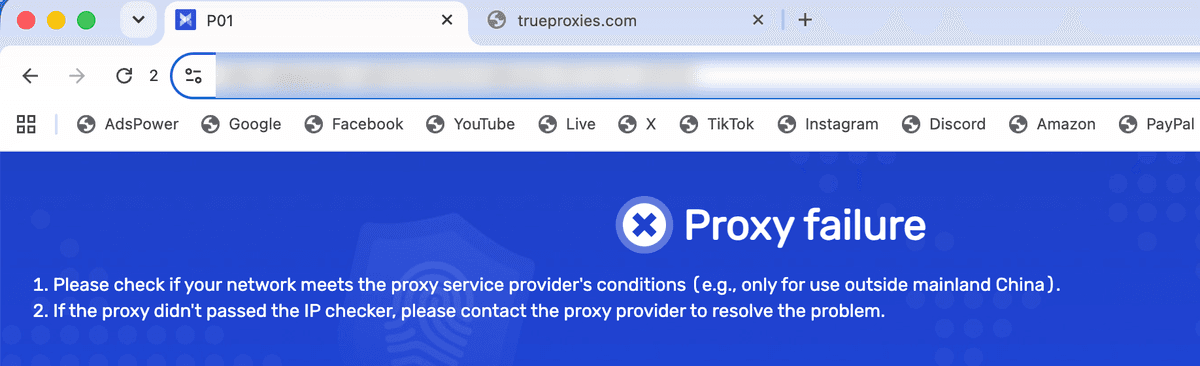
AdsPower reports proxy trouble in four places: the Check proxy result, status colors on the Proxies page, "Proxy failure" when a profile opens, and Network Diagnostics.
| On screen in AdsPower | What it usually means | Fix |
|---|---|---|
| "Connection test failed" on a new proxy (Connection test failed!) | "Wrong proxy password. Check the credentials on your service page." or "Username not recognised. Check the username on your service page." | Copy the credentials again from your dashboard |
| "Connection test failed" after adding targeting | "The targeting options in your username are not valid for this service. Check spelling, and do not repeat an option." | Use ISO codes (us, and gb for the UK), include country with city, and use a Traffic pack for city, region or ASN |
| "Connection test failed" right after setup | Type and port don't match (SOCKS5 on 8080, HTTP on 1080), or the HTTPS type doesn't open TLS to port 8443 | Pair HTTP with 8080 and SOCKS5 with 1080; if HTTPS fails on 8443, use HTTP on 8080 |
| "Connection test failed" on a proxy that worked | "This service has used its traffic allowance. Add traffic to continue." or "This service has reached its expiry date. Renew it to continue." or "Your trial has closed. Buy a paid plan to continue." | Add traffic, renew, or buy a Traffic pack |
| Red "Inactive and connection test failed" in a bulk check | "Too many new connections per second for this service's limit." or a bare 407 after repeated failed attempts | Check in smaller batches; after failures, wait 60 seconds |
| Gray "Waiting for check" | Not an error: the proxy hasn't been checked yet | Select it and click Check proxy |
| "Proxy failure" when a profile opens (Proxy failure on the start tab; ERR_PROXY_AUTH_REQUESTED when opening a site with the wrong password) | "This error means the proxy connection in the profile is failed." Often changed credentials, used-up traffic, or a VPN or proxy app on your computer | Run Check proxy, quit VPN and proxy apps, reboot, and try another network |
| "Abnormal" in Network Diagnostics | A clock more than 5 minutes off, a system proxy, or leftover HTTP_PROXY and HTTPS_PROXY variables | See Network Diagnostics below |
| Your own IP shows instead of the proxy's | A VPN or proxy extension in the profile | Remove it, then delete the profile's "Preferences" and "Secure Preferences" files |
AdsPower proxy connection test failed: read the gateway's reason
Anti-detect browsers show their own generic error and hide the gateway's reason. Paste the same proxy into the TrueProxies proxy checker, or run it with curl over HTTP on port 8080 and read the reason in the 407 body or the X-Proxy-Reason header:
curl -v -x "http://YOUR_USERNAME-country-us-session-shopus01:YOUR_PASSWORD@YOUR_HOST:8080" https://example.comSOCKS5 carries no reason text (it fails at the authentication step), so diagnose over HTTP even when the profile uses SOCKS5. Every reason is listed in proxy checker error codes, the errors docs, proxy errors explained and our anti-detect browser proxy errors guide.
When every proxy fails: Network Diagnostics
If the proxy checker passes but AdsPower fails, look at your computer. Open Network Diagnostics from your profile avatar (top right) or from the icon next to a connection failure message. It marks Version Info, Time Synchronization, Local Network, System Proxy and Proxy Information as "Normal" or "Abnormal".
AdsPower flags a clock that "differs from the server by more than 5 minutes," so turn on automatic time. On Windows, delete HTTP_PROXY and HTTPS_PROXY from the user and system environment variables; on macOS, turn off Web Proxy and SOCKS Proxy. If a row stays "Abnormal", restart the router, try a mobile hotspot, and check that security software isn't blocking AdsPower.
TrueProxies in AdsPower: test results
We saved 10 Traffic pack sticky sessions, two each in the US, the UK, Germany, France and Canada, and ran AdsPower's built-in check on all 10 over HTTP, HTTPS and SOCKS5. Then we opened each session in a profile with our IP, WebRTC and DNS leak tests. AdsPower's free plan allows two profiles, so we switched one profile between the saved proxies. Tested on macOS.
| Test | Result |
|---|---|
| AdsPower version | 8.7.23 (kernel 2.8.8.7, SunBrowser 151) |
| Check proxy, HTTP on 8080 | 10 of 10 |
| Check proxy, HTTPS on 8443 | 10 of 10 |
| Check proxy, SOCKS5 on 1080 | 10 of 10 |
| Timezone and language matched the exit IP | 10 of 10 |
| WebRTC leak test | No unexpected public address recorded in 8 sessions; 2 results were not recorded. |
| DNS leak test | Mixed: some runs needed review for off-country resolvers; others had no usable resolver evidence. WARP was active, so these runs do not prove DNS privacy. |
| Datacenter IPv6 | Not tested. |
| Sticky session held the same IP | Several IPs stayed the same for about 1 to 2 hours; others changed during that interval. The 24-hour hold was not verified. Sticky sessions are best effort. |
| Add Proxy kept lines that differ only by session ID | All 10 distinct session entries were retained in the saved proxy list. |
| Local API calls | From AdsPower's API docs; not tested by us (paid plans only) |
Choosing a proxy for AdsPower
- Session control: one sticky session per profile, a lifetime you set, and an easy way to get a new IP.
- Targeting depth: country at minimum; city, region and ASN for localized QA or client markets.
- Protocols: HTTP and SOCKS5 with username and password.
- Pricing model: per GB suits many light profiles; per IP suits a few profiles that keep one address.
- IP type: residential for consumer sites, static ISP for one IP over weeks, datacenter IPv6 only for IPv6-ready targets.
AdsPower's help center lists recommended providers, but any provider with host, port, username and password works. Where TrueProxies fits: the Traffic pack covers session control, targeting depth, both protocols and per-GB pricing for most profiles, with sticky sessions up to 24 hours. It does not cover static ISP or mobile, and Datacenter IPv6 is a niche option. Estimate traffic with the calculator.
AdsPower proxy FAQ
Does AdsPower have free proxies, or can you buy them in the app?
AdsPower has no free proxies and none of its own: it says it "does not provide any proxy services." Its Proxies page lets you order from a third-party provider, with AdsPower acting solely as the platform. To try a residential proxy in AdsPower at no cost, use the TrueProxies free trial: one hour with country targeting.
What is the AdsPower proxy price?
AdsPower doesn't sell proxies of its own, so the price depends on the provider you bring. A TrueProxies Traffic pack is billed per GB, not per IP or profile: $1.64/GB for 1 GB, $0.97/GB at 100 GB, $0.81/GB at 1,000 GB. All your profiles draw on one pack, each with its own session.
Why is my AdsPower proxy not working or showing "Proxy failure"?
"Connection test failed" means Check proxy couldn't connect; "Proxy failure" means the connection failed as a profile opened. Common causes are a type and port mismatch, wrong credentials, a misspelled targeting option, used-up traffic, or a VPN on your computer. The TrueProxies proxy checker shows the gateway's reason. If every proxy fails, run Network Diagnostics.
Does AdsPower have a proxy checker?
Yes. Check proxy tests proxies in the profile form, the profile list and the Proxies page, and the IP checker looks up each exit's location. It reports pass or fail, not the reason. For the reason, use the TrueProxies proxy checker; for leaks, run the WebRTC and DNS leak tests inside the profile.
What is the best proxy for AdsPower?
It depends on the job. Most browser profiles do well on residential proxies with sticky sessions you control, city or ASN targeting, HTTP and SOCKS5, and per-GB pricing. A profile that keeps one IP for weeks needs static ISP proxies, which TrueProxies doesn't offer. Datacenter IPv6 fits only when every target supports IPv6.
Is HTTP or SOCKS5 faster in AdsPower?
For browsing, the protocol rarely decides speed; the exit and the route matter more, and both carry the same encrypted traffic to HTTPS sites. Choose by compatibility and diagnosis: HTTP on 8080 returns error reasons, while SOCKS5 on 1080 doesn't.
Does AdsPower support IPv6 proxies?
Yes. AdsPower supports IPv6 proxies and accepts an IPv6 host in brackets. With TrueProxies, Traffic pack exits are IPv4 only and can't reach IPv6-only sites. Datacenter IPv6 exits are IPv6 only, so sites without an IPv6 address fail with a 502. Check each target with the IPv6 test first.
Is it legal to use proxies with AdsPower?
Proxies and anti-detect browsers are legal tools in most countries. What matters is how you use them: follow each site's terms and your local law. This is general information, not legal advice. Use of TrueProxies is covered by our acceptable use policy.